
ANPR (IPEL-B20V-LPR) Troubleshooting
Image Issues
Overexposure during the day
This is due to the sun's exposure to the license plate directly reflected off the camera lens, causing the image to be overexposed.
There are several fixes for this situation:
- Try to avoid east-west direction in installation
- Do not install the camera in the direction where the sun is just reflecting back, as shown in the picture below, it is recommended to install the camera on the B side of the road, not the A side. See below for a diagram example.
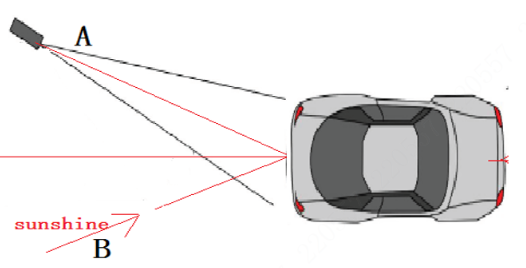
- Enable automatic aperture lens;
- Enable WDR
Overexposure at Night
- The brightness of the vehicle headlights results in the inability to see the license plate, there are several options to fix this issue.
- Enable WDR
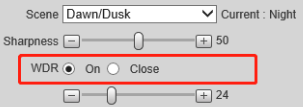
-
Enable the supplementary light of the camera
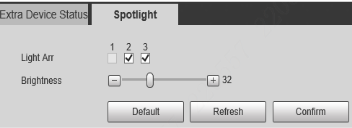
- Enable WDR
-
Other vehicles have their license plates washed out by lighting, resulting in overexposure
- Avoid headlight reflection angles
- Try to select parallel lanes for installation;
-
The camera's own light is too bright or the Angle is affected
- Reduce the brightness level of the built-in lighting of the camera
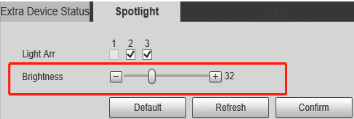
- Reduce the number of LEDs on;
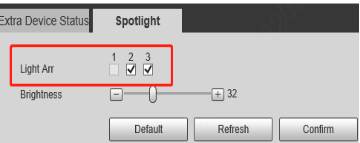
- Decrease the shutter and gain parameter values appropriately ( it is generally recommended to use the default value, and increase the value if necessary)
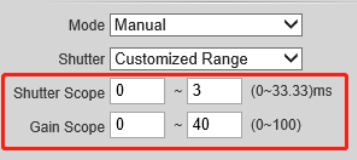
- Reduce the brightness level of the built-in lighting of the camera
Still stuck?
Our support team answers by email. It helps to have these ready:
Model numberSerial numberFirmware or app versionWhat you have tried